
Question
How do I fix this problem?
When I try to login to google mail the error message comes “your browser cookies functionality turned off please turn on“.
Solved Answers
If you getting this error message “your browser cookies functionality turned off please turn on” that means some internet setting has changed by the virus or may be by a 3rd party software. Don’t worry we have the proper solution for this particular error message. This will solve the issue for both Google mail and Yahoo mail.
Steps to fix the error “your browser cookies functionality turned off please turn on”
- Download this Hitman Pro32 | Hitman Pro64 for virus removal, Run this software and do the scan and removal of all viruses (if any virus detected).
- Restart the computer once.
- Download ATFcleaner and run it. Click on ‘select all’ and click on Empty Selected. It will take time to get it completed.
- Restart the computer once again.
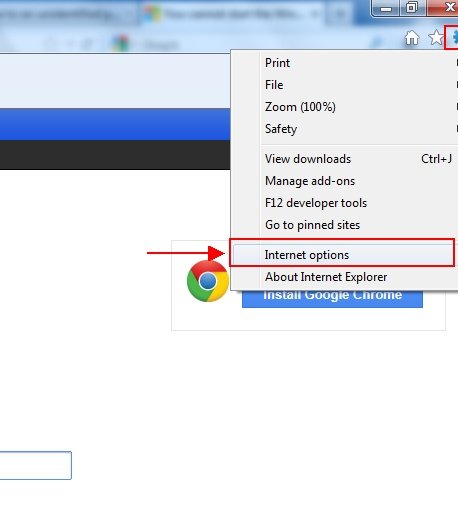
- Reset your Internet Explorer, Open the internet explorer and go to Tools>>Internet options>>Advance>> and click on Reset.
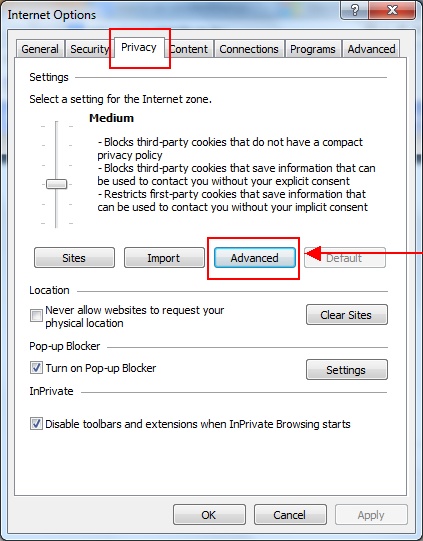
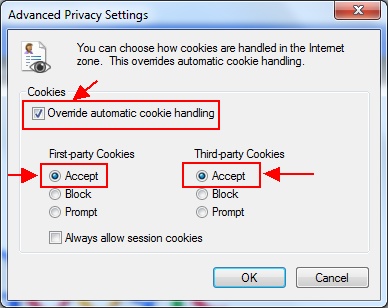
- Set cookies as accepted mode, Open internet explorer and go to Tools>>Internet options>>Privacy>> and click on Advanced button and you will get Advanced Privacy Settings window, then tick mark these options “override automatic cookies handling” make sure the first party cookies and third party cookies are checked. Then click on OK.
ScreenShots

This solution works!!!!!!!!!
I had this problem for about three days and could not resolve it. All sites gave the same, useless advice. The problem started after I installed AVG 2013. Regardless, I came upon these instructions and initially thought: “no way, that’s way too much effort that probably won’t work.” I eventually decided to follow these steps and quite amazingly, the problem is gone. I can now log into gmail and ebay like before.
Thanks for the explanation, now I my browser back to normal condition again. It really solved.
Thank you so much.. This really worked.I don’t know how else I could have solved it.
I was really starting to get depressed because we dont have enough money to get my computer fixed once again. (It froze for some weird reason last time)
Thank you!
If I may, What am i suppose to do..After Hitman Pro free trial ends?
Hmmm… my sister has the same problem on her PC. We followed all these steps but they did not work for her. She still can’t log in to gmail/ebay. I have to add that when I fixed my own machine, I first uninstalled AVG completely and used an AVG remover software to clear my PC of all AVG related files. I will do this on my sister’s PC and then follow these steps again. Perhaps it will work.
Its done…thanks
Thanks. Great Help. I tried every thing else but this one worked.
Thanks , It works
Thanks A lot , it works for me
Thank you soooo much!!
All I did was use the Hitman pro software and rebooted my computer and it worked! ^_^
Thank again!
Thanks very helpful. It works
THANK YOU!!!!!!!!!!!!!!!!!!!!!!!!!!! I WAS WORRIED SICK BUT THIS WORKED
hitman does it all
Thnks!!!!!!!!!!
Works like a charm….
thank you !!
iv been having this problem for a while
Thank you, it help me a lot
Just wanted to say thanks this worked, after trying lots of other things and not getting results this worked. I only did the Hitman Pro and ATFcleaner and restarted after both and back up and running. Thank Again
The Hitman Pro worked after weeks of looking for a solution.
Thanks! This worked for me!
— John Wallner
this was the only thing that worked for me, i havn’t been able to log on to gmail for 3 months . thank god this was here!
This worked when nothing else would–thank you so much for posting!
thaaaank you so much man, it worked after doing the first step
Thumbs high. Good work
nice work.. thanks alot
Thanks so much….it worked after the first step itself…..
Thank you so much. This method really works. I am using Firefox I had just run the hitmanpro on my PC, restart then all was back to normal.
Standard Internet explorer troubleshooting usually starts with removing your temp data files, cookies, and searching history. To get into your online options view your control panel and twice click the icon tagged “Internet” options. Click on the proper buttons to get rid of those things trying to load this program again
I finally fixed the problem thanks to your steps. I could not log into my aolmail or Google Chrome accounts. I had a virus, but thought everything was removed. I installed Norton and it kept letting me know that some Trojan needed attention and when I “solved it”, Norton kept notifying me it was back throughout my time on my laptop. I didn’t think this affected my login to aolmail and Google Chrome, but it did. ATFCleaner is amazing! It got rid of a bunch of threats that were hidden on my computer.
I finally fixed the problem thanks to your steps. I could not log into my aolmail or Google Chrome accounts. I had a virus, but thought everything was removed. I installed Norton and it kept letting me know that some Trojan needed attention and when I “solved it”, Norton kept notifying me it was back throughout my time on my laptop. I didn’t think this affected my login to aolmail and Google Chrome, but it did. Hitman Pro is amazing! It got rid of a bunch of threats that were hidden on my computer.
Thanks, it works!
works like a magic! Thank you so much!
Awsome!!! Thanks a lotz!!! 🙂
Yeeeaaaaahhhhh, it works!!
Thank you so much 🙂
God bless you! Fixed!
it worked, thanks solved my issue by using this article.. thank you so much..
thanks a lot, it’s worked , salute to you
Hi thanks for that valuable information… I stepped out from the problem by u r guidance… Thank you so much…
Thanks. Wife is leaving on trip and we had no time to take this to a shop. Fixed the problem (Googles). This was a lifesaver.
Fixed problem cheers
I\’ve been trying to use this approach but my wifi is extremely slow and Hitman Pro has only completed downloading once over 10 attempts. I then got a popup message that said HitmanPro has a virus and it deleted.
Fixed the problem after just doing the 1st step. I’m glad I found your solution. I hope more people will be helped by this solution.
What about a Samsung S5320? Please, I ve tried evrything but it does not work. Thanks for your helps
I couldnt get the atf cleaner shown above please tell me about the atf cleaner to download please
Works fine thx !!!!!!!
The cookies problem was solved, but I stil have a problem to access my gmail account. The page was on and off.
https://accounts.google.com/ServiceLogin?service=mail&passive=true&rm=false&continue=http://mail.google.com/mail/&scc=1<mpl=default<mplcache=2
Sir, you are GOD! And HitmanPro is GOD! You guys really solved this devastating problem! Thank you so much! I bought one copy of Hitmanpro right after this.
Thanks to you and Hitmanpro, from the bottom of my heart!!
This wont work for me because in addition to preventing cookies, I cannot download anything as Windows defender is broken. I don’t have chrome or foxfire, so I am really screwed here! Any help????
HI,
You tried our steps and did not work for you, that means might be some virus has into your computer, tha’t why it’s won’t work. because this is the exact solution for this issue.
First of all delete the virus.
Solution for “can’t downloading” issue, rename a folder “windows defender” to “windows defender.old”
Step: Click on START then click on COMPUTER then go to C drive then go to PROGRAM FILES, under program files rename a folder “windows defender” to “windows defender.old”
After that your download would be started.
Now download two software for virus scaning, Trojan Remover, Hitman Pro.
http://simplysup1.com/download/dl/trjsetup687.exe
http://www.techsupportall.com/download_hitman
http://www.techsupportall.com/download_hitman_64
Scan your computer from above tools, then follow the same steps again to solve “cookies issue”.
If you need any help please mail me direct at ifno@techsupportall.com
Thanks
Dear all,
it is great for me. i has solved the problem as error message appear: your browser cookies functionality turned off please turn on. i really thank to all of your valuable comment.
Thanks & Best regards
Seangly
Dear all,
i got new issue with my laptop running window 7 utimate 32 bit
when i startup window with normal it can login as simple but after 15 minute the screen display nothing and appear slightly green screen.
but if i login with safe mode it is simple not have any issue.
Please help to solve me
Thanks in advance
Thank you so much
This solved my problem too
Help!!! I cant’t even get pass the 1st step. Everything I try to download fails cos it says failure as there is a virus detected.
on winxpsp3 cis 2013.facing this problem.workeg
Here is a specific example of this, you might need to go to either Control Panel (or via Internet Explorer) and then select Internet Options [or first select “Network and Internet” depending on which menu you start from] / Privacy / Select Sites / and on the “Per Site Privacy Actions” and then in the “Managed websites” look and see if you are Setting “Always Block” on it. If so, either Remove it, or Always Allow.
This was the cause of the problem that nothing else I tried in any browser would remove this Google login Problem – that requires cookies. That is NOT clear where the blocking of cookies is coming from in any way. It is the Windows Internet Security management that was stopping it via Internet Options, and it is not strictly speaking happening through a setting on the browser you are using.
So doing complete “resets” might likely solve the problem, but you lose all of the settings you had. In my case, getting to the specific cause of the trouble was key. Otherwise, I might fall into this hole again.
we r a same problem cookies turn it of
You produced some decent points there. I looked on the net to the problem and discovered many people goes together with along along with your web site.
I relish, cause I discovered just what I used to be taking a look for. You’ve ended my 4 day lengthy hunt! God Bless you man. Have a great day. Bye ddcgdkcbddcdcdef