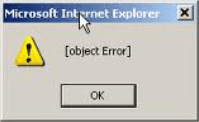
How to fix Object Error in internet explorer
Question
How to fix object error in internet explorer, when i try to open internet explorer it shows error message “object error” this comes up when i try to open any new webpage.

Solved Answers
When you open Internet explorer you got the message ‘Object Error’ that means Internet explorer getting lot of load of unwanted toolbars, BHO’s, addon’s, extensions.
We have the proper solution for that error message ‘Object Error‘.
Here are the few steps to resolve this problem, please follow these steps it automatically resolved.
___________________________________________________________________________________
Steps.
If you getting this error message when you open Internet explorer. “object error”
1. Uninstall Unwanted Toolbars from add/remove program
Example:-
privacy safe gaurd toolbar
unfriend checker toolbar
Price peep today toolbar
Coupon amazing toolbar
We-Care Toolbar
2. Download this Hitman pro 32bit | Hitmanpro 64bit for virus removal, Run this software and start scanning and remove the viruses infection files (Remove if any virus detected)
3. Disable Unwanted Add-ons you can use this MS fixit
4. Reset Internet Explorer Security Settings by Internet property option >> security >> Reset all zone to default level
5. Reset Internet explorer by reset button.
6. Restart your computer, after restarted problem will be fixed.
If you feel that your problem has been solved or you feel it’s worth to donate so please Donate us as Little as $2


Very good and concise resolution. Thanks
very helpful, thanks
Thanks for the info!!!!! It worked like a charm!!!!
Thanks for the suggestion, however; it won’t fix the error on my PC. I am running IE9 on a Win 7 – 64 Bit OS
@Lamin, If that does not resolve the issue, it means you have an antivirus or security program that is trying to scan webpaged but has been disabled. So enable those and it should help resolve the Issue.
@Hemant, can you explain how to do what you told Lamin? I have the same as Lamin … IE9, Win 7 – 64 bit os … my error pops up on different sites on IE9 … ‘Message from webpage [object Error]‘. I have used ctrl + alt + delete to get out of it … I’ve discovered that the website has duplicated its ‘Task’, and by ending the second task the error is ended and the webpage cleared. But I would LOVE to know how to completely eliminate the pop-up box altogether … do you know how?
Many thanks, Minque
I had the same problem. Close IE9 and remove “Unfriend Checker” from Add/Remove programs.
I followed all 5 steps but without resulting in deleting the unwanted object error problem
Dude right on…. you’re a Genius!!!! Mine was doin that bad, been runnin searches and comin up empty. Was bout to give up when i ran across this post. Followed steps and So far it’s runnin like a dream!!!
I followed the steps and it fix the issue. thanks
Thank you so much I had been trying to get rid of this problem for quite some time ,I had previously disabled some add-ons . That worked for awhile then it started popping up again about 2 weeks ago nothing stopped it this time untill I found your post . IE may not be the fastest browser however it is my preferred browser .
Always leery of fixes you find on the internet, but this was legit. Object Error issue was fixed. Took about 20 minutes…
Your instructions are very clear. You have done a great public service. Thank you very much. I am in your debt. I am now rebooting to see whether it works.
Hey Tech,
I’v searcher far and long for the solution to the cursed [object Error] issuse. I followed your instrutions to the T, re-booted and IT WAS GONE!!!!!. U DA MAN!!,..,eh.Girl!,..?!..TECH:) whomever,
Thanks for the 1 in 20 posts to actually offer real tech advise.
much appreciated. To All out there, This advise works.
Thanks
Perfect
Very Useful
how to open a pic when it show invalid image
That means either file gone corrupted or possibility to computer don’t have the appropriate association to open this file in that case you have to fix the file association issue. Check out this article to fix association issue.
http://www.techsupportall.com/file-association-fix-for-windows-7/
http://www.techsupportall.com/file-association-fix-for-windows-xp/
I kept having this webpage error message appear. The customer service rep Danny helped me through it and it worked. Great website! Thanks for helping. It was quick and easy.